IPAdapterは、既存のtxt2img拡散モデルに対して、軽量かつ高性能な画像プロンプト機能を提供する新しいアダプターです。従来のアダプターモデルと比較して、IPAdapterは計算コストを抑えながらも優れた性能を発揮し、画像生成の品質を大幅に向上させます。本記事では、IPAdapterのアーキテクチャやそのメリット、評価結果について簡単に解説します。
※概要を把握するためのノートであり、数式的な部分は扱わないので、あしからずご理解よろしくお願いします。
IPAdapterとは

Recent years have witnessed the strong power of large text-to-image diffusion models for the impressive generative capability to create high-fidelity images. However, it is very tricky to generate desired images using only text prompt as it often involves complex prompt engineering. An alternative to text prompt is image prompt, as the saying goes: "an image is worth a thousand words". Although existing methods of direct fine-tuning from pretrained models are effective, they require large computing resources and are not compatible with other base models, text prompt, and structural controls. In this paper, we present IP-Adapter, an effective and lightweight adapter to achieve image prompt capability for the pretrained text-to-image diffusion models. The key design of our IP-Adapter is decoupled cross-attention mechanism that separates cross-attention layers for text features and image features. Despite the simplicity of our method, an IP-Adapter with only 22M parameters can achieve comparable or even better performance to a fully fine-tuned image prompt model. As we freeze the pretrained diffusion model, the proposed IP-Adapter can be generalized not only to other custom models fine-tuned from the same base model, but also to controllable generation using existing controllable tools. With the benefit of the decoupled cross-attention strategy, the image prompt can also work well with the text prompt to achieve multimodal image generation. The project page is available at \url{https://ip-adapter.github.io}.

IPAdapterの概要
IPAdapterは、事前に学習されたtxt2imgへの拡散モデルに対して、画像プロンプトを使用して画像生成を可能にする軽量なアダプターです。
※アダプターとは
機械学習におけるアダプターは、大規模な事前学習済みモデルを微調整する際に用いられる手法です。アダプターは、既存のモデルのパラメータを凍結し、少量の追加パラメータを学習することで、新しいタスクや条件に対応します。これにより、計算コストを大幅に削減しながら、元のモデルの性能を保持しつつ新しい機能を追加することができます。
IP Adapterのアーキテクチャ
IP Adapterは画像の特徴をエンコードし、モデルへ入力するために以下の二つの層をStable Diffusionモデルに追加します。
- 画像エンコーダ
- 画像プロンプトから画像特徴を抽出する層です。
- エンコーダーの後ろにモデル間の微調整用の線形結合層だけ追加してそこだけ学習させます。
- エンコーダーは学習済みのものを使用します。(論文ではViTが使用されています。)
- Decoupled Cross-Attention
- 抽出された画像特徴を事前学習されたベースモデルに組み込む層です。
- 元々のモデルではテキストプロンプト用のCross Attentionしかないのですが、これとは別に画像プロンプト用のCross Attentionを追加します。
追加後のアーキテクチャが以下であり、この中でも赤い部分が追加されたレイヤーです。Text Encoderと並列の立ち位置で画像用のEncoderを追加し、これをIP Adapter用に新しく用意したCross AttentionでUNet側に結合しています。
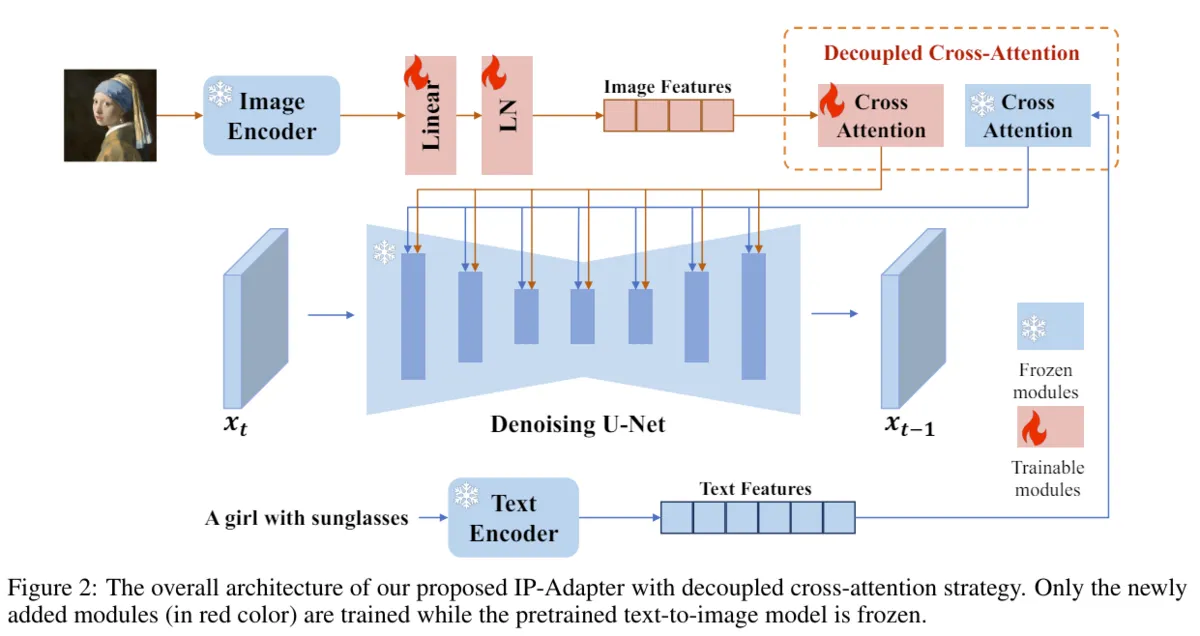
やってることは画像を言語ベクトルにしてCross Attention経由でUNetに入力しているだけなので、ほぼText Encoderと同じかと思います。新規性としてはCross Attention層を別にしていることで、これによりテキストと画像のプロンプトが競合せず、双方の特徴が独立して活用されるようなり、品質が上がったと推察されています。
IP Adapterのメリット
- 軽量にモデルを学習できる、かつ高性能
- モデル全体をファインチューニングせずにファインチューニングと同等、もしくはそれ以上の性能が出るらしいです。IP Adapter自身の学習パラメーターは競合している研究の中で一番少なく、コストが低いと主張しています。
- 汎用性
- 様々な学習済ベースモデルであったり、ControlNet, T2I-Adapterといった既存のツールと互換性があります。
基本的にメリットはLoRAと同様で、UNetとは独立した機構(TextEncoderと同じ立ち位置)で動いてることから別のツール(ControlNet、LoRA)との組み合わせでも上手く動くってことだと理解しました。
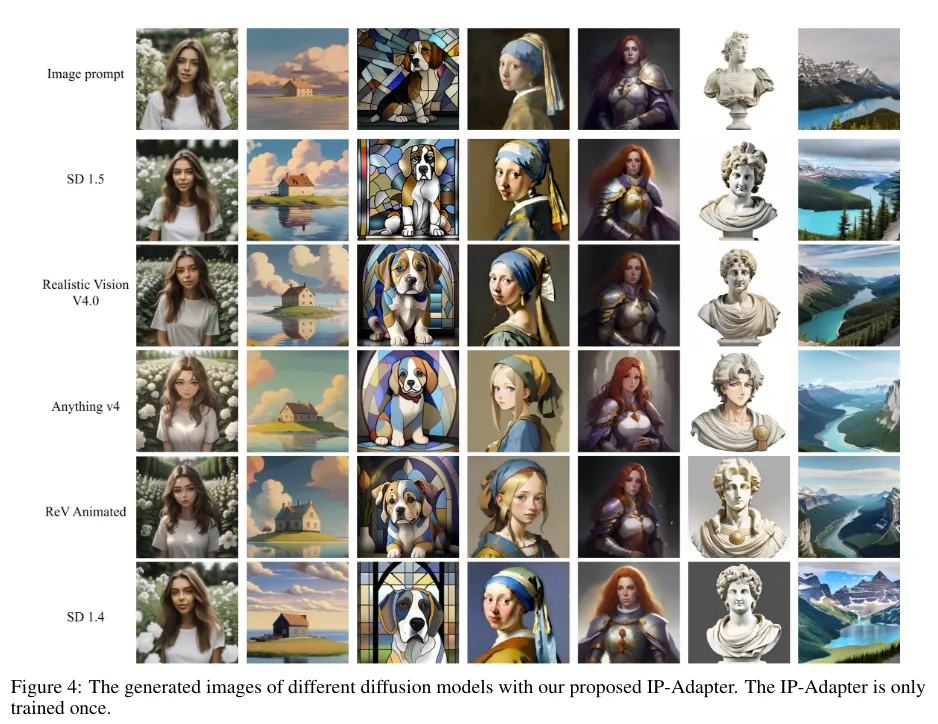
評価結果
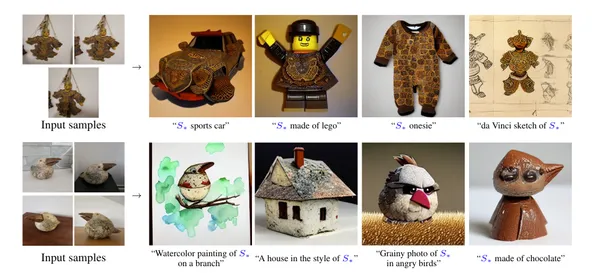
全てのモデルで、スタイルを保持しながら異なる画像として生成されていることがわかる結果になっています。
まとめ
IPAdapterは、低コストで高性能な画像生成を実現し、幅広い応用が期待される技術です。本記事で紹介したアーキテクチャや評価結果を通じて、その有用性と潜在的な可能性を理解していただけたのではないでしょうか。
以下の記事でComfyUIでの使用方法を説明してるので、ぜひ試してみてください。

>-
Stable Diffusion周りで読んだ論文は以下の記事でまとめているので、興味ある方はぜひご活用ください。
Stable Diffusion関連の論文解説記事のリンク集。画像生成・動画生成の基礎モデルから応用技術まで論文ベースで解説。