以前Stable Video Diffusionの公式デモを実行しようとしてメモリ不足エラーになってたのですが、他の方法で実行することができたので紹介しようと思います。ついでに僕自身の技術理解もかねてどういう手法なのかも説明を入れておきます。
以前の記事は↓

>-
Stable Video Diffusionとは
Stable Diffusionのモデルをベースに動画が生成できるように拡張したモデルです。学習方法、モデルのアーキテクチャの面において動画用に工夫を施し、空間方向だけでなく時間方向の知識を持ったモデルの作成に成功しました。
We present Stable Video Diffusion - a latent video diffusion model for high-resolution, state-of-the-art text-to-video and image-to-video generation. Recently, latent diffusion models trained for 2D image synthesis have been turned into generative video models by inserting temporal layers and finetuning them on small, high-quality video datasets. However, training methods in the literature vary widely, and the field has yet to agree on a unified strategy for curating video data. In this paper, we identify and evaluate three different stages for successful training of video LDMs: text-to-image pretraining, video pretraining, and high-quality video finetuning. Furthermore, we demonstrate the necessity of a well-curated pretraining dataset for generating high-quality videos and present a systematic curation process to train a strong base model, including captioning and filtering strategies. We then explore the impact of finetuning our base model on high-quality data and train a text-to-video model that is competitive with closed-source video generation. We also show that our base model provides a powerful motion representation for downstream tasks such as image-to-video generation and adaptability to camera motion-specific LoRA modules. Finally, we demonstrate that our model provides a strong multi-view 3D-prior and can serve as a base to finetune a multi-view diffusion model that jointly generates multiple views of objects in a feedforward fashion, outperforming image-based methods at a fraction of their compute budget. We release code and model weights at https://github.com/Stability-AI/generative-models .

学習方法
まず学習方法について説明すると次の3段階で学習を行ったとのことです。
- テキストから画像を作るための訓練(text-to-image pretraining)
- テキストとそれに対応する画像のペアのデータセットで通常のStable Diffusionモデルを訓練します。
- ビデオのための基本的な訓練(video pretraining)
- テキストから画像を生成するモデルに時間的な情報(フレーム間の連続性)を追加するために、モデルに層(temporal layer)を追加します
- モデルを収集したビデオで訓練します
- 高品質なビデオのための微調整(high-quality video finetuning)
- 高品質なビデオを選定し、動きの少ないシーンやテキストが多すぎるクリップを除去します。
- 高品質なビデオのデータセットを使ってモデルを微調整します
アーキテクチャ
次にモデルがStable Diffusionモデルをどうやって動画用に拡張したかを説明します。学習方法の項でも少し出てきましたがStable DIffusionモデルにTemporal Layerという空間方向の情報を学習するための層を学習途中に追加します。Temporal Layerは、3次元畳み込みと時間軸に沿ったattentionを適用しているようです。以下の論文で提唱されたもののようなので、気になる方は下の論文を読んでみてください。
Latent Diffusion Models (LDMs) enable high-quality image synthesis while avoiding excessive compute demands by training a diffusion model in a compressed lower-dimensional latent space. Here, we apply the LDM paradigm to high-resolution video generation, a particularly resource-intensive task. We first pre-train an LDM on images only; then, we turn the image generator into a video generator by introducing a temporal dimension to the latent space diffusion model and fine-tuning on encoded image sequences, i.e., videos. Similarly, we temporally align diffusion model upsamplers, turning them into temporally consistent video super resolution models. We focus on two relevant real-world applications: Simulation of in-the-wild driving data and creative content creation with text-to-video modeling. In particular, we validate our Video LDM on real driving videos of resolution 512 x 1024, achieving state-of-the-art performance. Furthermore, our approach can easily leverage off-the-shelf pre-trained image LDMs, as we only need to train a temporal alignment model in that case. Doing so, we turn the publicly available, state-of-the-art text-to-image LDM Stable Diffusion into an efficient and expressive text-to-video model with resolution up to 1280 x 2048. We show that the temporal layers trained in this way generalize to different fine-tuned text-to-image LDMs. Utilizing this property, we show the first results for personalized text-to-video generation, opening exciting directions for future content creation. Project page: https://research.nvidia.com/labs/toronto-ai/VideoLDM/
ComfyUIで動画生成する手順
ComfyUIのインストール
こちらの記事を参照ください。
>-
ワークフローの作成
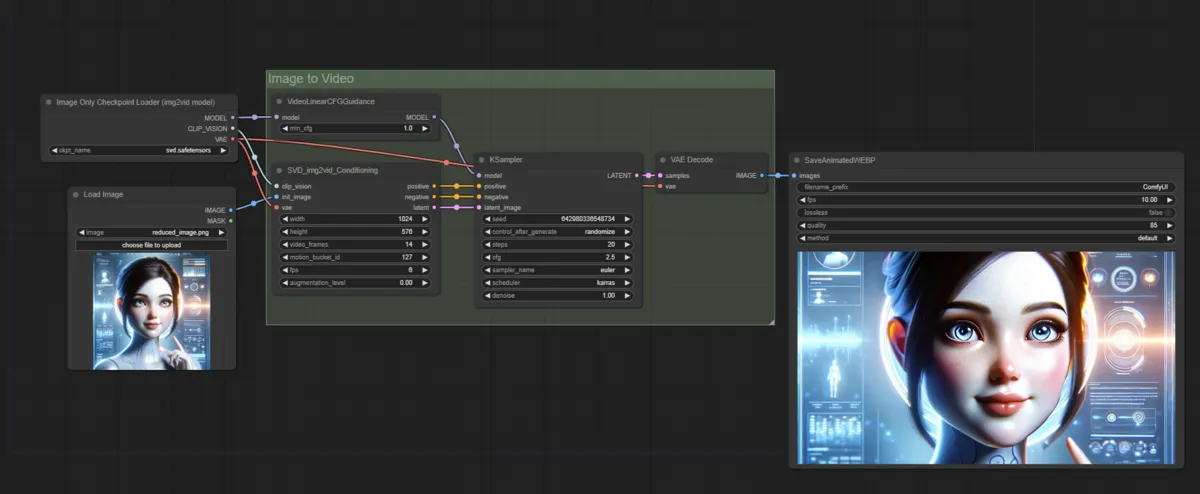
今回は公式で提供されているものをそのまま使います
- workflowのダウンロードとLoad
- 今回はcomfyUI公式が提供しているワークフローを使います。
-
Video Examples
Examples of ComfyUI workflows
モデルのダウンロードと配置
- SVD用チェックポイントをダウンロードしてくる
- 通常とXT用のどちらかダウンロードして
/ConfyUI/models/checkpointに置く -
stabilityai/stable-video-diffusion-img2vid at main
We’re on a journey to advance and democratize artificial intelligence through open source and open science.
huggingface.co -
stabilityai/stable-video-diffusion-img2vid-xt at main
We’re on a journey to advance and democratize artificial intelligence through open source and open science.
huggingface.co
- 通常とXT用のどちらかダウンロードして

生成する
Checkpoint Loaderノードに先ほどダウンロードしたチェックポイントを設定する- 出ない方は画面を更新すればプルダウンに表示されると思います。
- 後はパラメータを調整してQueue Promptを実行すればOKです。
生成結果
最後に
動きは指定できないので完全な運ゲーな感じですね。狙った動画は出せないのと長尺で出そうとすると絵崩れするので、現状だとAnimateDiffの方がコンテンツ作成には向いてるのかなって感じがします。動作の指定などカスタマイズができたりするので。image2videoでなく、text2videoが公開されるのを期待して待ちたいと思います。
動画生成に関連する他の手法を試したい方は下記のリンク集をぜひご活用ください。
>-