Stable Audio Open is a variant of the Stable Audio model trained exclusively on royalty-free audio sources, specifically to address copyright concerns around music generation.
With its free public release, I decided to set up and run the official demo locally. Here is how to do it.
Requirements
- PyTorch 2.0 or later
- A GPU with CUDA support is recommended (it is quite slow on CPU)
Execution Method
Step 1: HuggingFace Setup
Request access to Stable-Audio-Open on HuggingFace
You need to be logged in to accept the terms and request access.
We’re on a journey to advance and democratize artificial intelligence through open source and open science.

Generate an Access Token
Once logged in, generate a token at the link below. You’ll need this to authenticate with the HuggingFace CLI.

We’re on a journey to advance and democratize artificial intelligence through open source and open science.
Step 2: Prepare Environment and Run the Demo
- I used Python 3.10.14
- If you don’t want to clutter your local environment, run this inside a venv.
# Install dependencies (alternatively: pip install . inside the repo)pip install stable-audio-tools
# Additional packages I needed in my environmentsudo apt install libsndfile1sudo apt install nvidia-cuda-toolkitpip install flash-attn
# Authenticate with HuggingFacehuggingface-cli login
# Clone and run the demogit clone https://github.com/Stability-AI/stable-audio-tools.gitpython ./stable-audio-tools/run_gradio.py --pretrained-name stabilityai/stable-audio-open-1.0
Step 3: Access the Demo
Once the demo starts successfully, a URL will be displayed. Open it in your browser.
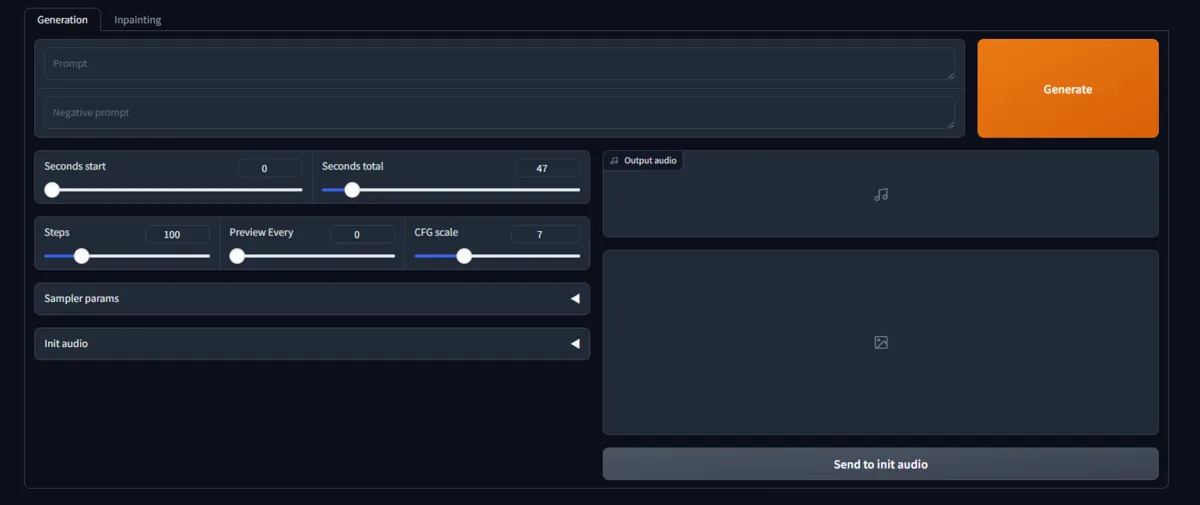
Bonus: Disabling the Public URL
By default, a public URL accessible from anywhere on the internet is created by Gradio.
If you don’t want to expose the URL publicly, change the share parameter in interface.launch (line 18 of run_gradio.py) to False.
Alternatively, you can pass username and password as options to run_gradio.py to enable Basic authentication.
Generation Result
positive prompt:
Trance, Progressive, Rock, EDM
negative prompt:
harsh, loud, chaotic, aggressive, dissonant, jarring, abrupt, noisy, overpowering, unsettling, atonal, disruptive
Conclusion
I’m not very knowledgeable about music, but as an amateur I think the output roughly matched what I had in mind.
The stable-audio-tools repository also includes training scripts, so if you want to generate melodies similar to a specific song, that might be worth trying. It’s likely fine-tuning, though, so expect to need substantial memory and training data.
Personally I was happy to get it running successfully, so I’ll leave it here for now.