akuma.ai has been getting a lot of attention lately (apologies if this info is out of date). Looking at what it does, I felt something similar should be reproducible in ComfyUI — so I gave it a try.
Workflow File

Setup Procedure
1. Set Up ComfyUI
Install ComfyUI using the following method.

>-
2. Install Extension
Install the following extension into ComfyUI. Using ComfyUI-Manager makes this easy.

Custom nodes that extend the capabilities of Comfyui - AlekPet/ComfyUI_Custom_Nodes_AlekPet
3. Download and Place the Model
Download LCM-LoRA and place it in the LoRA directory.
LCM-LoRA - Acceleration Module! Tested with ComfyUI, although I hear it's working with Auto1111 now! Step 1) Download LoRA Step 2) Add LoRA alongsi...

4. Import the Workflow
Download from the link below and import it into ComfyUI.
5. Configure Models
Set the LCM-LoRA in the Load LoRA node, and set your preferred base model in the Load Checkpoint node.
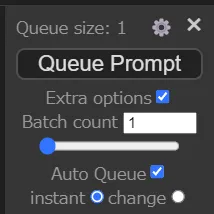
6. Configure Auto Queue
Set things up so that generation runs automatically whenever the paint canvas or parameters are updated.
Specifically, configure Extra Options as shown below.
7. Generate
Once you click Queue Prompt, your scribble will be reflected in the Preview Image node almost in real time.
Tips
- Adjust the prompt to match what you want to generate. Using an embedding like EasyNegative in the negative prompt can help improve results.
- The seed is fixed so the output doesn’t change randomly between generations. You can update it manually via the Primitive node if the current seed isn’t producing good results.
- LCM-LoRA isn’t the only option for real-time generation. Lightning, Turbo, and Hyper models can all work as replacements.
Generation Result
Apologies for my poor drawing skills…







Conclusion
The results look pretty decent, don’t they? Without a video it’s hard to fully show it off, but if you actually try it, what you paint gets reflected nearly in real time — which makes it genuinely fun to play with.
Being able to run something like this for free locally is exactly the kind of thing open source excels at. If this looks interesting to you, definitely give it a try.