RIFE is a method for Frame Interpolation that increases the frame rate of a video to make motion significantly smoother. Instead of directly generating high-FPS video, RIFE takes an existing video and synthesizes new in-between frames, effectively multiplying the frame rate. The technique is commonly used as a post-processing step in AI video generation pipelines to reduce the choppy, low-FPS feel that often comes with generation.
In this article, I’ll walk you through how to set up and use RIFE within your ComfyUI workflow.
For a simple technical overview of how RIFE works under the hood, see the article below — worth reading if you’re curious about the underlying mechanism.

>-
Work Procedure
1. Introduction of ComfyUI
Set up ComfyUI using the method below. If you already have it installed, please update to the latest version as well.
>-
2. Installation of Extensions
Install the following two extensions. Video Helper Suite handles reading input videos and saving output videos.

A custom node set for Video Frame Interpolation in ComfyUI. - Fannovel16/ComfyUI-Frame-Interpolation


Nodes related to video workflows. Contribute to Kosinkadink/ComfyUI-VideoHelperSuite development by creating an account on GitHub.
3. Create Workflow
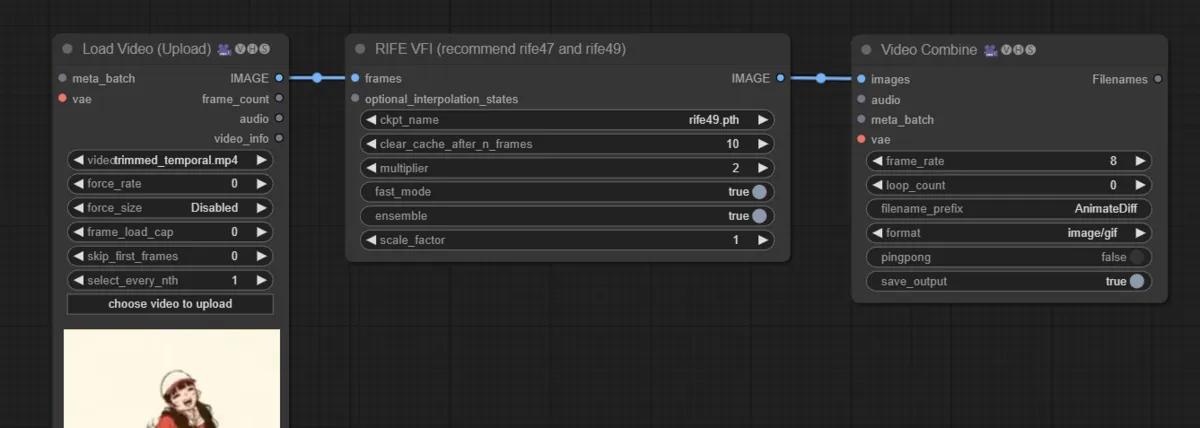
Create a RIFE VFI node and connect it as shown in the image below.
The multiplier value determines how many times the frame rate is multiplied. A multiplier of 2 doubles the FPS. Increasing the multiplier raises the FPS further, but also worsens accuracy, memory consumption, and processing time, so it’s generally safer to keep it at a modest value.
4. Execute
Select the input video and run the workflow.
Generation Result
Since I didn’t have a suitable new video handy, I used one I had generated previously.


Conclusion
There is a clear and noticeable difference in smoothness before and after Frame Interpolation. The choppy, low-FPS look that is common in AI-generated video is considerably reduced, making motion much more natural to watch.
RIFE is one of the post-processing techniques most worth adding to an AI video generation workflow when output quality matters.