
This time I will generate video using AnimateDiff. Since it is a method extending image generation model of Stable Diffusion slightly, it becomes quite lightweight model. Yet it can generate reasonably good videos so please try.
Please refer to following article for specific method.

>-
Work Flow
- Introduction of ComfyUI
- Introduction of ComfyUI-AnimateDiff-Evolved
- Creation of Workflow
- Download and Placement of Model
- Generate
1. Introduction of ComfyUI
I summarized introduction method in following article, so please refer here.
>-
2. Introduction of ComfyUI-AnimateDiff-Evolved
Plugin introduction is necessary for AnimateDiff. Please add ComfyUI-AnimateDiff-Evolved to ComfyUI before creating workflow. Via ComfyUI-Manager is easy, but installation by git clone to ComfyUI/custom_nodes directory is also possible.

Improved AnimateDiff for ComfyUI and Advanced Sampling Support - Kosinkadink/ComfyUI-AnimateDiff-Evolved

3. Creation of Workflow
- Add
AnimateDiff LoaderandVideo Combinenodes - Connect as shown in figure.
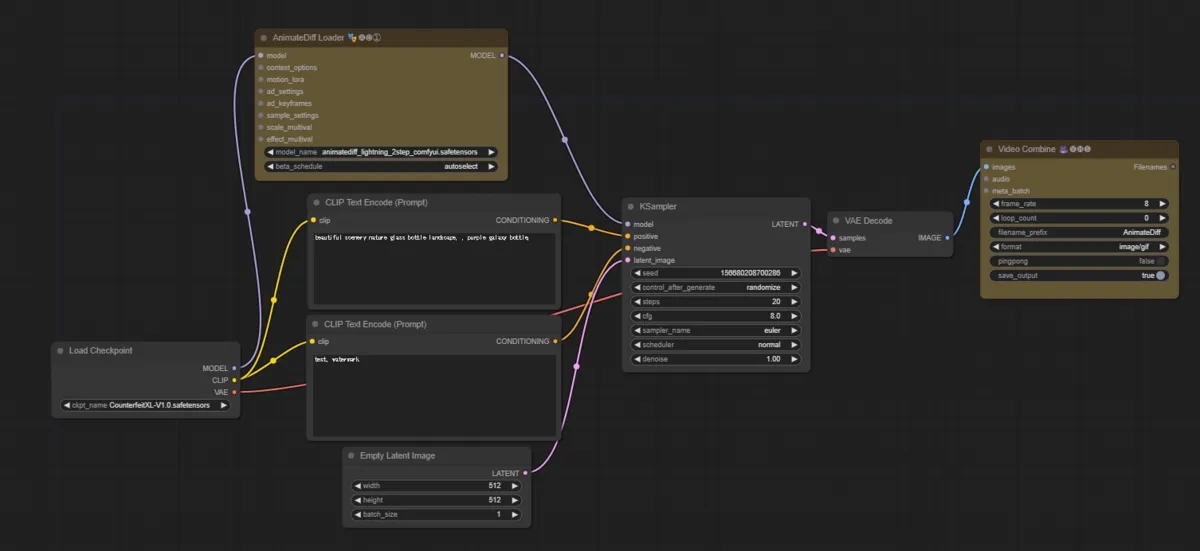
AnimateDiff Loader extends model, and Video Combine connects continuous images and converts to video.
4. Download and Placement of Model
- Prepare favorite base model and AnimateDiff model.
- In my case I downloaded AnimateDiff model from ↓.
-
guoyww/animatediff at cd71ae134a27ec6008b968d6419952b0c0494cf2
We’re on a journey to advance and democratize artificial intelligence through open source and open science.
huggingface.co
- Place base model in
ComfyUI/models/checkpoints - Place AnimateDiff model in
ComfyUI/models/animatediff_models


5. Generate
- Since batch_size becomes video length, tweak length
- Note if too long, memory consumption increases and accuracy worsens
- Tweak other parameters as you like and
Queue Prompt
* Additional steps if generating with Motion LoRA
Note Motion LoRA currently seems to support only Animatediff V2. If version not supported, even if Motion LoRA sits in, absolutely no movement occurs.
Correction of Workflow (With Motion Lora)
- Create
Load AnimateDiff LoRAin workflow created above - Connect
Load AnimateDiff LoRAnode toAnimateDiff Loadernode.
Download and Placement of Motion LoRA
- Download favorite Motion LoRA
- Put in
ComfyUI/models/animatediff_motion_lora
At Generation
- Select favorite Motion LoRA in
AnimateDiff Loadernode
Generation Result
Without Motion LoRA
With minimum configuration, stuck for about 1 hour and got this much

With Motion LoRA
I used ZoomOut Motion LoRA and it is applied reasonably well.

Conclusion
I felt adjustment of parameters slightly more difficult than case of image generation. (Hard to get output as expected) Regarding AnimateDiff, since there seem to be various methods like ControlNet and Frame Interpolation, I will try sometime.
If you want to try other methods related to video generation, please utilize the link collection below.
>-
Bonus (Tried Hires.fix configuration)
Workflow is this.
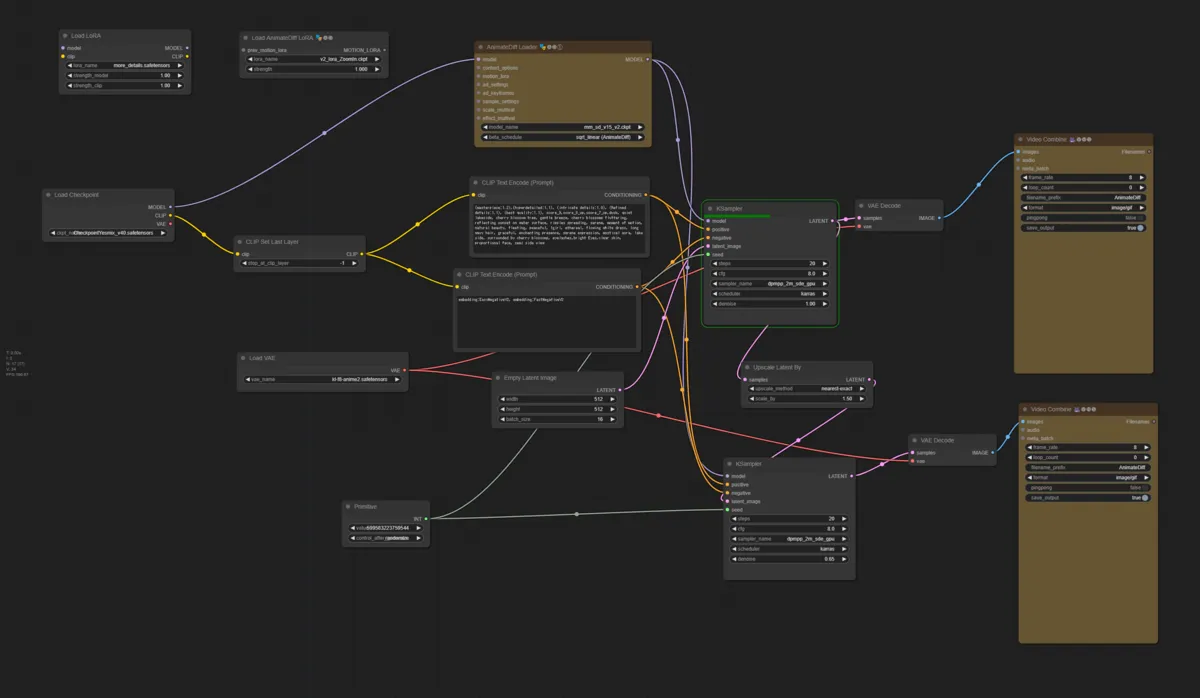
Generated is this