I finally got around to building a Discord BOT to receive notifications from my homelab server.
When you’re running Kubernetes day-to-day, you inevitably want an easy way to catch updates like “Did this job finish?” or “Are there any anomalies?” Emails get buried among other alerts, and setting up Slack for a personal homelab feels a bit overkill. Discord, on the other hand, seamlessly delivers notifications to both mobile and desktop, making it perfect for personal use.
Here is a quick write-up on how I integrated it with my homelab k8s environment.
Choosing the Gateway Approach Over Webhooks
The official Discord Developer Portal provides a few quick-start samples.
Step-by-step tutorial for building your first Discord app.
While webhooks are common in BOT development, I wanted to keep this entirely closed within my homelab k8s network. I wanted to avoid the approach where Discord has to hit a webhook on my end (which would require exposing the server to the internet). Therefore, I opted for the Gateway approach, which initiates the connection from my side.
For notifications coming from various apps within k8s, the BOT runs an internal API server to receive these requests and then forwards them to Discord.
Let’s start with the Discord setup.
Creating the Application and Getting the Token
First, head over to the Discord Developer Portal to create an app.
Build games, experiences, and integrations for millions of users on Discord.

- Create a new application and give it a suitable name.
- Go to the “Bot” tab and select “Reset Token” to generate a new token.
Make sure you copy the generated token immediately, as it will be hidden once you leave the page. This is the key your application needs to connect to Discord.
Adding the BOT to Your Server
Next, use the URL generator under the “OAuth2” tab to invite the BOT to your server.
Check the bot and applications.commands scopes.
As for permissions, Send Messages is the bare minimum, but for your own test server, you might as well grant Administrator to save yourself some headache.
Clicking the generated link will allow you to add the BOT to your server. Just be careful to select the correct server from the dropdown.
Building a Lightweight API with Go and discordgo
Here is the final product I put together.
Contribute to tamara1031/botama development by creating an account on GitHub.

For the implementation, I chose Go and the bwmarrin/discordgo library.
(Golang) Go bindings for Discord. Contribute to bwmarrin/discordgo development by creating an account on GitHub.
Since it’s running on k8s, the lightweight footprint and fast startup time of a Go container make it the absolute right choice.
I offloaded most of the coding to Opus. I simply gave it instructions on the structure—like “abstract the feature additions and toggles so they are easy to manage around module.go”—and it handled all the tedious routing and interface design. It’s honestly a lifesaver.
Testing Locally
First, let’s run a local test using Docker Compose.
Create a .env file, set the DISCORD_TOKEN you grabbed earlier, and start the container.
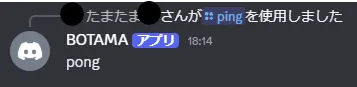
After a short wait, the application commands will sync, and you’ll be able to use slash commands on Discord. As a neat trick, if you invite the BOT to the server again, it seems to force an immediate sync of the commands.
Kubernetes Integration and an Unexpected Benefit
Now that it’s working locally, it’s time to implement the actual goal: sending notifications from the homelab server.
The mechanism is simple: the BOT exposes an API endpoint, and it forwards the received payload to Discord. However, leaving it completely open, even on a private network, feels wrong, so I slapped on a simple Bearer token authentication.
Let’s boot it up and test it with a quick curl command.
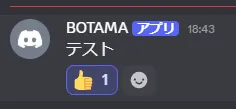
curl -X POST http://localhost:8080/notify \ -H "Authorization: Bearer your_api_key" \ -H "Content-Type: application/json" \ -d '{"content": "Test"}'With a satisfying ping, the message popped up on Discord.
The Potential of Bidirectional Communication
I originally started building this just as a “notification sink,” but once I had it running, I was genuinely surprised by something. Thanks to the Gateway approach, I can interact with the bot from Discord without ever exposing my server to the public internet.
This is a massive advantage for balancing security and convenience. It means I can use Discord not only to receive alerts but also to trigger actions like “restart server” or “fetch logs for this container” directly from an error notification.
If you’re in the homelab space and thinking about doing something similar, I highly recommend giving it a try. With AI assisting, building something at this level is incredibly easy.