Lately, AI-driven automated refactoring has become surprisingly practical.
I’ve been using Claude’s Max plan (the 5x capacity one), and while the model is great, the constant 6-hour rate limits and sometimes sluggish response times were starting to grate. I suspect Claude spends a lot of time looping internally to ensure precision, but for bulk tasks, I needed something faster and more resilient.
That’s when I decided to give Codex another look. Running tasks via the web UI showed it had incredible stamina before hitting any limits. I’m not sure which model version is under the hood, but while it might fail a bit more often than Claude, its sheer throughput is exactly what I was looking for.
Best of all, the subscription plan apparently allows for CI/CD usage! This means I can integrate it directly into an application and run workflows as much as I want.
So, I decided to deploy Temporal on my home K8s cluster to build an endless automated refactoring machine.
Temporal service. Contribute to temporalio/temporal development by creating an account on GitHub.

Running Automation with a Codex Subscription
In short: you can use the auth.json file.
Sign-in methods for Codex

Use Codex's built-in refresh flow to keep auth.json working on trusted CI/CD runners
Specifically, you use the auth.json generated when you log in via the browser using the Codex CLI. It feels like a bit of a backdoor, but since it’s documented on the official site, I’ll take it. Note that it contains a refresh_token that rotates periodically, so you’ll need to regenerate it occasionally when it expires.
However, as stated in the documentation, there are some operational rules to follow. The second point might be a bottleneck when considering K8s distribution. It could become risky if multiple workflows run concurrently. It might be better to control it so that only one runs at a time.
Operational rules that matter
- Use one auth.json per runner or per serialized workflow stream.
- Do not share the same file across concurrent jobs or multiple machines.
- Do not overwrite a persistent runner’s refreshed file from the original seed on every run.
- Do not store auth.json in the repository, logs, or public artifact storage.
- Reseed from a trusted machine if built-in refresh stops working.
Why Temporal?
When it comes to AI-integrated workflow engines, there are plenty of trendy options like n8n, Dify, or LangGraph. However, these feel very tightly coupled to the current AI paradigm. If the way we use AI changes significantly, these tools might become obsolete.
I wanted something paradigm-agnostic. Specifically, an OSS tool that can be extended via plugins and has great affinity with distributed environments. My final choices were:
- Windmill.dev: Extremely low-level and customizable, but the learning curve felt like a vertical wall.
- Kestra: Declarative and powerful.
- Temporal: The “Codex official support” and the fact that I could test code in my local IDE and deploy the exact same logic as a container image were the deciding factors.
With Temporal, the script that runs in production is the same one I tested locally. This “what you see is what you get” behavior is a huge relief when you’re letting an AI write the code.
Creating the Worker Image
Temporal requires a worker image with all dependencies pre-installed. I set up a repository for this:
Contribute to tamara1031/temporal-repo-steward development by creating an account on GitHub.
I implemented the refactoring logic as a state machine, separating the design, implementation, and review phases rather than using a black-box sub-agent approach.
Overall Architecture

Main Workflow: periodicRefactorWorkflow
This is the core refactoring logic.

Child Workflow: robustPRMergeWorkflow
This workflow handles CI waiting and self-healing.

Running it Locally
Running this locally only consumed about 6% of my 5-hour Codex Plus budget. Compared to the rigid Claude Max subscription, this setup feels much more scalable for experimental automation.
Visibility into the State
The Temporal Web UI makes it incredibly easy to see exactly where the bottleneck is. Since the steps are granular, I can monitor the implementation and review phases in real-time.
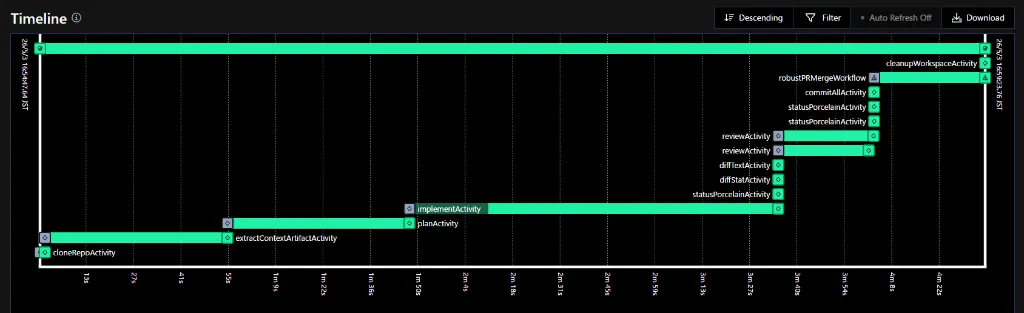
The child workflow also shows the CI wait times and conflict resolution steps clearly.

Automated PRs in Action
Here is one of the PRs generated by the system:
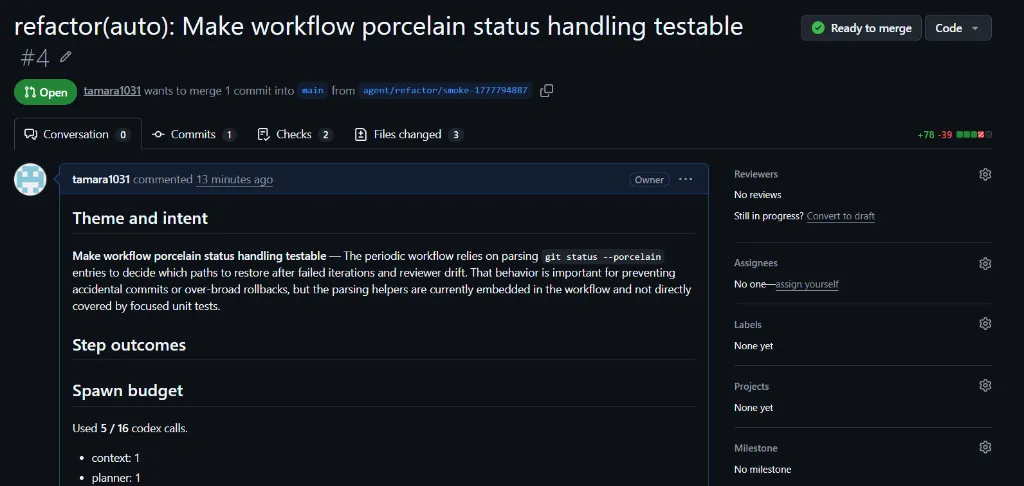
Theme and intent Make workflow porcelain status handling testable — The periodic workflow relies on parsing git status --porcelain entries to decide which paths to restore after failed iterations a...
Deploying to the Homelab
Once local testing was done, I deployed it to my Kubernetes cluster:
- Added the DB and user to PostgreSQL.
- Set up ExternalSecrets for GitHub and Codex credentials.
- Updated the Helm values and worker deployment.
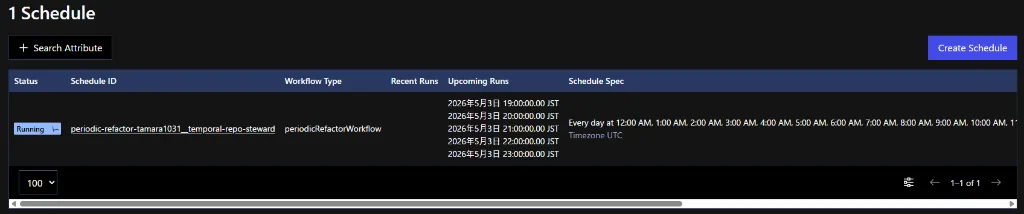
- Registered the schedules via an ArgoCD-managed job.
One minor hiccup: The Helm chart didn’t automatically create the default namespace, which caused the Web UI to misbehave. I had to jump into the admintools pod and create it manually.
kubectl exec -it deployment/temporal-admintools -n temporal -- /bin/shtemporal operator namespace create --namespace default --address temporal-frontend:7233Now, the PRs are rolling in automatically.
Wrapping Up
Now I can just let it run.
With automated merging, I can theoretically refactor my entire codebase continuously. The next step will be to tighten the constraints using better Linters/Formatters and refining the instructions to stabilize the output quality.
I’m also thinking about an Issue-driven workflow next. We’ll see.
Codex turned out to be a surprisingly generous partner for this kind of work. See you next time.