I switched VS Code Copilot Chat’s utility model to a local LLM. Just a few lines of config.
Copilot can generate commit messages even on the free plan, so I’d been using it without thinking. At some point the limit kicked in. Writing commit messages by hand is annoying enough that I didn’t want to go back — apparently I’ve gotten too used to AI doing it — so I pointed the utility model at a local LLM instead.
Registering a Custom Endpoint in VS Code
VS Code supports custom Language Model endpoints. Open the command palette with Ctrl+Shift+P, search for “Manage Language Models”, then choose “Add models” → “Custom Endpoint”. The configuration is saved to chatLanguageModels.json.
[ { "name": "homelab", "vendor": "customendpoint", "apiKey": "${input:chat.lm.secret.-44f93762}", "apiType": "chat-completions", "models": [ { "id": "Gemma-4-E4B-it-GGUF", "name": "Gemma-4-E4B-it-GGUF", "url": "https://inference.homelab.otama-playground.com/v1/chat/completions", "toolCalling": true, "vision": true, "maxInputTokens": 128000, "maxOutputTokens": 16000 }, { "id": "Gemma-4-E4B-it-GGUF-nothink", "name": "Gemma-4-E4B-it-GGUF-nothink", "url": "https://inference.homelab.otama-playground.com/v1/chat/completions", "toolCalling": true, "vision": true, "maxInputTokens": 128000, "maxOutputTokens": 16000 }, { "id": "Qwen3.6-35B-A3B-GGUF", "name": "Qwen3.6-35B-A3B-GGUF", "url": "https://inference.homelab.otama-playground.com/v1/chat/completions", "toolCalling": true, "vision": true, "maxInputTokens": 128000, "maxOutputTokens": 16000 }, { "id": "Qwen3.6-35B-A3B-GGUF-nothink", "name": "Qwen3.6-35B-A3B-GGUF-nothink", "url": "https://inference.homelab.otama-playground.com/v1/chat/completions", "toolCalling": true, "vision": true, "maxInputTokens": 128000, "maxOutputTokens": 16000 } ] }]The apiKey uses a VS Code input variable — it prompts for the value when first added. Put the LiteLLM API key there. After saving, the homelab provider’s models appear in Copilot Chat’s model picker.
Assigning Models by Task
The per-task model assignments go in settings.json:
"chat.utilitySmallModel": "customendpoint/Gemma-4-E4B-it-GGUF","chat.utilityModel": "customendpoint/Gemma-4-E4B-it-GGUF","chat.planAgent.defaultModel": "Qwen3.6-35B-A3B-GGUF (customendpoint)","inlineChat.defaultModel": "Qwen3.6-35B-A3B-GGUF (customendpoint)","chat.exploreAgent.defaultModel": "Gemma-4-E4B-it-GGUF (customendpoint)"chat.utilitySmallModel and chat.utilityModel handle lightweight operations like commit message generation. Pointing these at Gemma-4-E4B means those requests no longer consume Copilot quota.
Plan agent and inline chat handle heavier tasks, so those get Qwen3.6-35B.
Honest Assessment
Commit message quality is slightly below the premium models. But “read a diff, produce one line” is squarely within Gemma-4-E4B’s range.
One thing to be aware of: the first request after a cold start takes a few seconds longer while the model loads into VRAM. After that it’s 1–2 seconds. The first commit of the day just feels a bit slow.
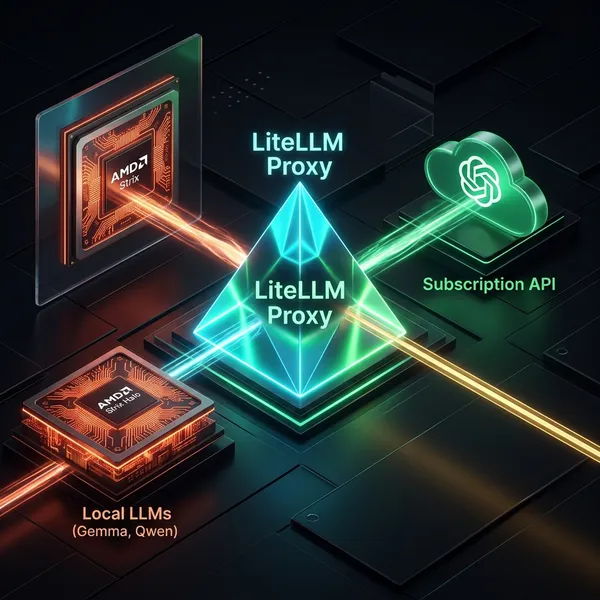
Since ChatGPT is also integrated into LiteLLM, switching the utility model to gpt-5.2 or gpt-5.3 is an option. It’s covered by the ChatGPT subscription so no extra cost, and no warmup delay. For now Gemma-4-E4B is good enough that I’d rather keep it local.
Summary
Registering a local LLM in chatLanguageModels.json and pointing chat.utilityModel at it was all it took to stop commit message generation from consuming Copilot quota.
Having everything unified in LiteLLM means switching from Gemma-4-E4B to ChatGPT — if local stops being good enough — is a one-line config change. Being able to treat local LLMs and cloud APIs the same way turned out to be more useful than expected.
Hopefully useful for anyone trying to stretch the Copilot free tier further.